An array is a data structure that provides a fixed-size, ordered collection of elements or values of the same type.
Arrays are some of the oldest and most utilized data structures. Many other data structures like Hash maps use arrays for their implementation; this is because, given an index, the lookup is constant-time O(1) which means that the array can grow indefinitely, and you can still access data almost instantly.
The index
An index is the position of a given value in the array. Some implementations have arrays start at index 1, which means the first element in the array is at index 1, the second at index 2, and so on; Most implementations, however, will have the array start at index 0.
Same data types and fixed size
The reason behind an array’s very fast lookup speeds is that they are stored in a contiguous memory location and not scattered through different parts of the memory. When an array is initialized, we set the size of it so the system can claim that space in memory for the array. That means that if we declare an array of 8-bit integers that can hold ten elements, the system will reserve an 80-bit space of memory for us to use.
Now that we have our array in memory and know how big our data is, we can get to any spot on the array via our index and some basic math. If our array of size 10 holds 8-bit integers, all we need to do is get the memory address where our array starts.
Let us assume that our array starts at memory address 200. Suppose we want to get the element inside the array at position three. In that case, all we have to do is sum the start of the array by the product of the index times the size of our data, in this case, 8 bits: 200 + (index * 8); This will give us memory address 224, and we know that from that point, the next 8 bits are our data and we can retrieve it and read it.
var array [10]int8
array[0] = 2
array[3] = 42

fmt.Println(array) // [2 0 0 42 0 0 0 0 0 0]
// Without a specific size, the typed array will automatically resize
const typedArray = new Int8Array(8, {maxByteLength: 10});
typedArray[0] = 2;
typedArray[3] = 42;
console.log(typedArray); // [2, 0, 0, 42, 0, 0, 0, 0, 0, 0]import array
# create an array of 10 int8 values with an initial value of 0
int_array = array.array('b', [0] * 10)
int_array[0] = 2
int_array[3] = 42
print(int_array) # array('b', [2, 0, 0, 42, 0, 0, 0, 0, 0, 0])Inflexible by design
Arrays are inflexible, so the implementations we see more often are a more flexible version, often called slices or lists. The flexible implementations handle resizing for us because we often do not know what the final size of our array will be, and setting a huge array size is often a waste of space; we, instead, resize the array once it has reached its total capacity, this is done by declaring an entirely new array with a bigger size limit and copying everything from the original array onto the new one; this does come with a performance penalty which can become very obvious when our array is large and resized often.
// In Go, the flexible arrays are called slices
slice := make([]string, 0)
fmt.Println(len(slice)) // 0

slice = append(slice, "hello", "world")

// Resizing is handled automatically
fmt.Println(slice) // [hello world]
fmt.Println(len(slice)) // 2
// In Javascript, flexible arrays are also called arrays
const array = [];
console.log(array.length) // 0
array.push("hello", "world")
// Resizing is handled automatically
console.log(array) // ["hello", "world"]
console.log(array.length) // 2# In Python, flexible arrays are called Lists
my_list = []
print(len(my_list)) # 0
my_list.append("hello")
my_list.append("world")
# Resizing is handled automatically
print(my_list) # ['hello', 'world']
print(len(my_list)) # 2Another thing flexible implementations may allow is the ability to store more than one type of data inside of the array, so instead of being made up entirely of off integers or strings, we can store whatever mix of data we wish; we can have integers, strings, and other arrays inside of our array; this, however, means that the data structure underneath our slice is not an actual array; for example, Javascript allows both variable-size and multiple data types in their arrays but under the hood they are objects where the keys are numeric indices.
slice := make([]int, 0)

slice = append(slice, 42)
// In Go, trying to append a data type that is not the one initially declared will result in a compiler error.
slice = append(slice, "hello") // cannot use "hello" (untyped string constant) as int value in argument to append
const array = [];
array.push("hello", 42)
// multiple data types are allowed in Javascript arrays
console.log(array) // ["hello", 42]my_list = []
my_list.append("hello")
my_list.append(42)
# Multiple data types are allowed in Python lists
print(my_list) # ['hello', 42]Use Cases
Arrays are well suited in situations where the collection size is known or stays mostly the same.
Arrays are commonly used in mathematical operations; for example, the mathematical concept of a matrix can be represented as a two-dimensional grid; this is why often two-dimensional arrays (an array that contains more arrays) are called “matrices.”
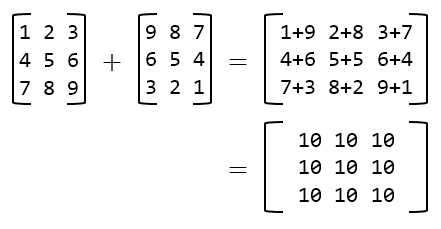
They are also used for storing large data sets or when there is a need for random access to elements; for example, in an application that tests our internet speed, we can use an array to store the speed values over a defined period; This allows for easy calculations like averages and trends.
Arrays are also used in many algorithms and file formats; for example, an image can be represented as a two-dimensional array where each value represents a pixel on the image; this makes calculations that help to process images easier, like compression algorithms or filters.
Big O notation
The Big O notation for an array are as follows:
| Operation | Big O |
|---|---|
| Insert to end | O(1) |
| Insert at start | O(n) |
| Remove from end | O(1) |
| Remove from start | O(n) |
| Search | O(n) |
| Access | O(1) |
| Space | O(n) |
In Summary
Arrays are an instrumental data structure with many applications over different fields, serving as the building blocks of other data structures. Programming languages tend to have arrays and a more flexible version of it that handles resizing automatically; this makes it easier to use for scenarios where our data can grow over time.